How to Use WhatsApp Business with Multiple Users: 4 Options
Can several people use one WhatsApp Business number? We compare linked devices, Meta Verified, Coexistence and the API: limits, risks and who each fits.
Published: November 12, 2026· 7 min read

In a small business, WhatsApp usually starts on a single phone. As messages grow, that phone starts traveling from desk to desk: one person answers an order question, another shares shipping details, and messages that arrive in the evening wait until the next morning. Sooner or later the question comes up: how do we use WhatsApp Business with several people and on several devices?
There's no single answer. Meta officially offers four routes, and each has different limits. In this article we compare all four with their real constraints and explain which one fits which kind of business.
Short answer
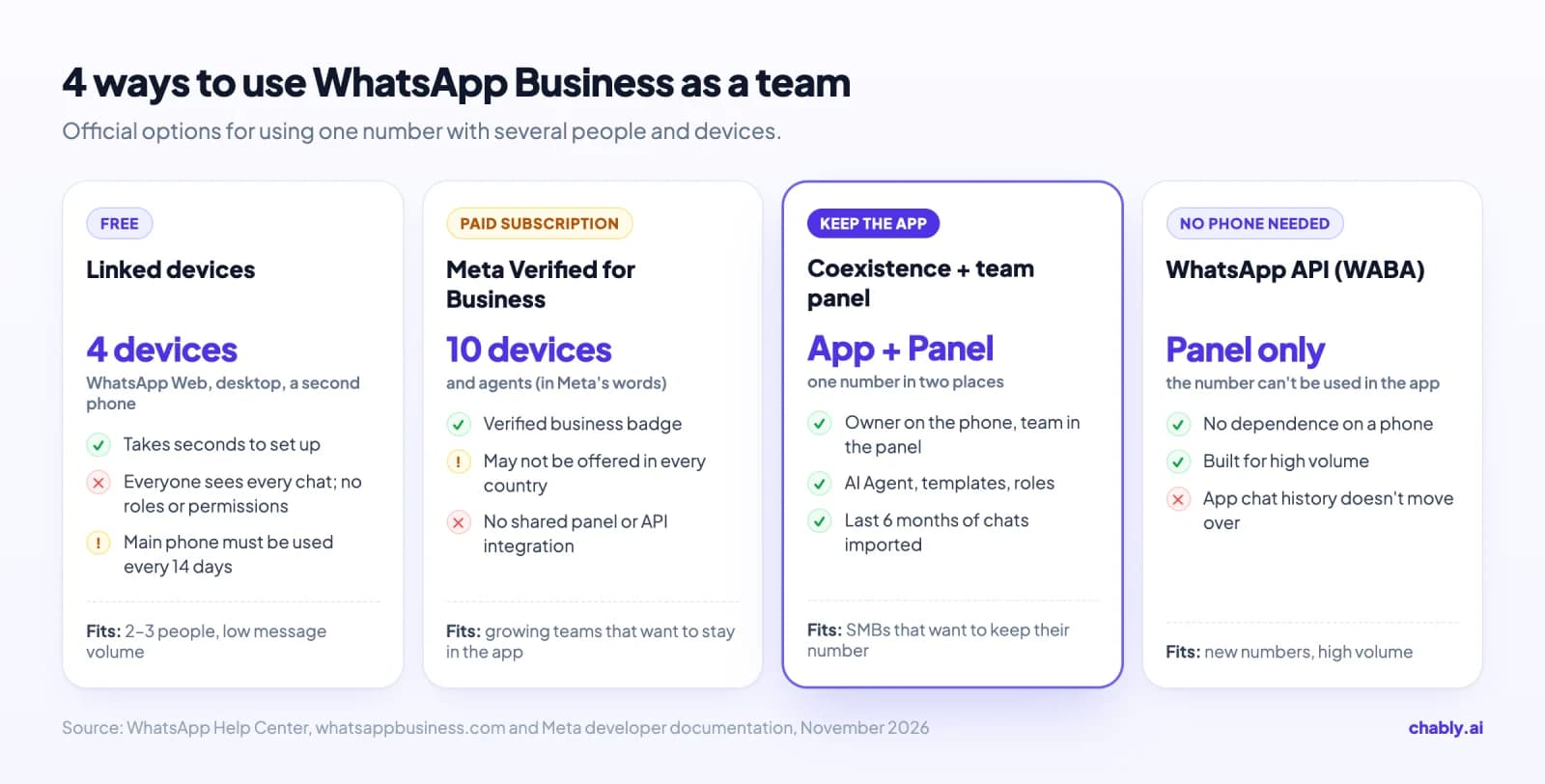
For free, you can use WhatsApp Business on up to 4 devices linked to your phone (WhatsApp Web, the desktop app or a second phone). The paid Meta Verified subscription allows, in Meta's words, up to 10 devices and agents. For teams that need roles, permissions and AI, the official route is Coexistence: you connect the same number to a team panel without giving up the app on your phone. For a setup that is fully independent of any phone and built for high volume, use the WhatsApp API (WABA).
Option 1: Linked devices (WhatsApp Web, desktop, a second phone)
The WhatsApp Business app lets you add up to 4 linked devices to your main phone. These can be WhatsApp Web, the WhatsApp app on a computer, or a second phone. You set them up in seconds from the Linked devices menu on your phone, and it's free.
According to the WhatsApp Help Center, linked devices keep working even when the main phone is offline. Two rules apply, though: if you don't use WhatsApp on the main phone at least once every 14 days, your linked devices are logged out, and a linked device that isn't used for 30 days is removed automatically.
For a team of two or three with low message volume, this can be enough. As the team grows, the limits show:
- No roles or permissions. Every linked device sees every chat; you can't show an employee only certain customers.
- No clear ownership. Two people answer the same customer, or a message goes unanswered because everyone assumes someone else will reply.
- A hard cap of 4 devices. For a fifth person, someone has to log out.
- No advanced automation or integrations. The app's greeting and away messages send a fixed text and don't answer questions; chats don't flow into your CRM or other systems.
- When an employee leaves, you have to remove their device from the phone yourself, or they keep access.
Option 2: Meta Verified for Business
Meta Verified for Business is a paid subscription for the WhatsApp Business app. Alongside a verified business badge, it lets you link up to 10 devices and agents to your account, according to Meta's product page. In other words, it's a bigger version of the linked-devices option.
It's an option for teams that want to stay inside the app but need more than 4 devices. The basic structure doesn't change, though: there's no shared panel, no per-number permissions and no CRM integration. Check in the WhatsApp Business app's settings whether Meta Verified is offered in your country.
Option 3: Coexistence, one number on the phone and in a team panel
Coexistence (Coex) is an official Meta feature. You keep using the WhatsApp Business app while the same number is connected to a team panel through the Cloud API. The owner keeps chatting from the phone; the team sees and answers the same chats in the panel. Messages on both sides stay in sync. For the full picture, read What is WhatsApp Coexistence?
What sets Coexistence apart from linked devices is that the panel is built for teams:
- Roles and per-number visibility: you decide which teammate sees which number's chats.
- An AI assistant: the AI Agent can give the first reply on the number all the time or only after hours. When you reply from the phone or the panel, it steps back in that chat.
- Your history comes with you: within 24 hours of connecting, your contacts and up to the last 6 months of one-to-one chats are imported into the panel.
- Official API tools: such as Meta-approved message templates and the 24-hour rule enforced in the panel.
Coexistence has limits too: group chats don't come to the panel, throughput is capped at 20 messages per second, and you need to open the app on the phone roughly every two weeks. Our screen-by-screen guide, How to set up WhatsApp Coexistence, lists all of these rules.
Option 4: WhatsApp API (WABA), a number independent of any phone
With the WhatsApp Business API, the number isn't tied to a phone; it runs entirely on the server and in the panel. No phone has to stay on, and it's the most flexible setup for team size and message volume. In exchange, the number can no longer be used in the WhatsApp app on a phone: if you move an existing number to the API, the account in the app is deleted and the chat history on the phone doesn't move over.
That's why WABA usually suits businesses starting with a new number or messaging at very high volume. We explain how the API works in What is the WhatsApp Business API?
The 4 options compared
| Linked devices | Meta Verified | Coexistence + team panel | WhatsApp API | |
|---|---|---|---|---|
| People / devices | 4 linked devices | 10 devices and agents | Team members in the panel | Team members in the panel |
| Phone app | Keeps working | Keeps working | Keeps working | Can't be used |
| Roles and permissions | None | None | Yes | Yes |
| Shared panel and AI Agent | None | None | Yes | Yes |
| Existing chat history | Stays on the phone | Stays on the phone | Last 6 months imported | Doesn't move over |
| Phone dependency | Used every 14 days | Used every 14 days | Opened roughly every 2 weeks | None |
| Cost | Free | Paid subscription | Software subscription + Meta's API message fees | Software subscription + Meta's API message fees |
Unofficial routes: QR-based tools
Many tools connect a number with a QR code on top of WhatsApp Web. They're tempting because setup is quick, but they aren't Meta's official API: they need the phone to stay on and connected, and heavy use puts the number at risk of restrictions. That's why we recommend the WhatsApp QR connection, which Chably also offers, for trials and low volume. We cover the differences in QR vs Coex vs WABA and Why WhatsApp Business numbers get banned.
Which option fits you?
- You're two or three people with few messages: start with linked devices. It's free and set up in seconds.
- You want to stay in the app but 4 devices aren't enough: consider Meta Verified.
- You want a team, permissions and AI without changing the number customers know: move to a team panel with Coexistence. For SMBs, this is the most balanced option.
- You run high volume or want the number to have nothing to do with a phone: use the WhatsApp API (WABA), ideally with a new number.
Using WhatsApp as a team with Chably
Chably is an official Meta Tech Provider and sets up Coexistence and WhatsApp API connections through Meta's official signup flow. Once a number is connected, you and your team can:
- Invite teammates and use roles to decide which numbers' chats they can see.
- Manage several numbers and your Instagram DM account in the same shared inbox.
- Turn on the AI Agent per number and choose what it does after hours (stay silent, send an info message, or reply once business hours start). When you reply to a chat, the AI steps back, and you can hand the chat back to it with one click.
- Create saved replies and Meta-approved templates in the panel and submit them for approval.
- Spot chats that came from ads: chats from Click-to-WhatsApp ads are tagged with their ad source.
Advanced team features such as chat assignment, internal notes and tags are coming soon. For current plans, see the pricing page, or book a demo and set things up with our team.